
Implementation
Our on-call voice agent in 95 minutes. Get notified
When production systems breaks, our own voice agent calls us. Our engineer built it in 95 minutes. Here is how to be informed constantly and why it was so easy.
Vytenis ·
I can easily imagine a scenario like this: It's 3 a.m. Production breaks. My phone rings.
An AI robot reads out an alert title. Press 1 to acknowledge. Press 3 to silence. Then you get up, open the laptop and start searching for what actually broke. Or a human if I am at the big enterprise.
Our CTO Tautvydas wanted something better for our own team. A call you can talk to. "What's failing?" "What do the logs say?" "Acknowledge it." All before the laptop is open.
So he built it. It took him 95 minutes. And he is sure it will not break.
In this post:
- What the call sounds like.
- How it was built in 95 minutes.
- How to trust if it will not fail on a critical moment.
- Build your own: same pattern, different alerts.
What the call sounds like
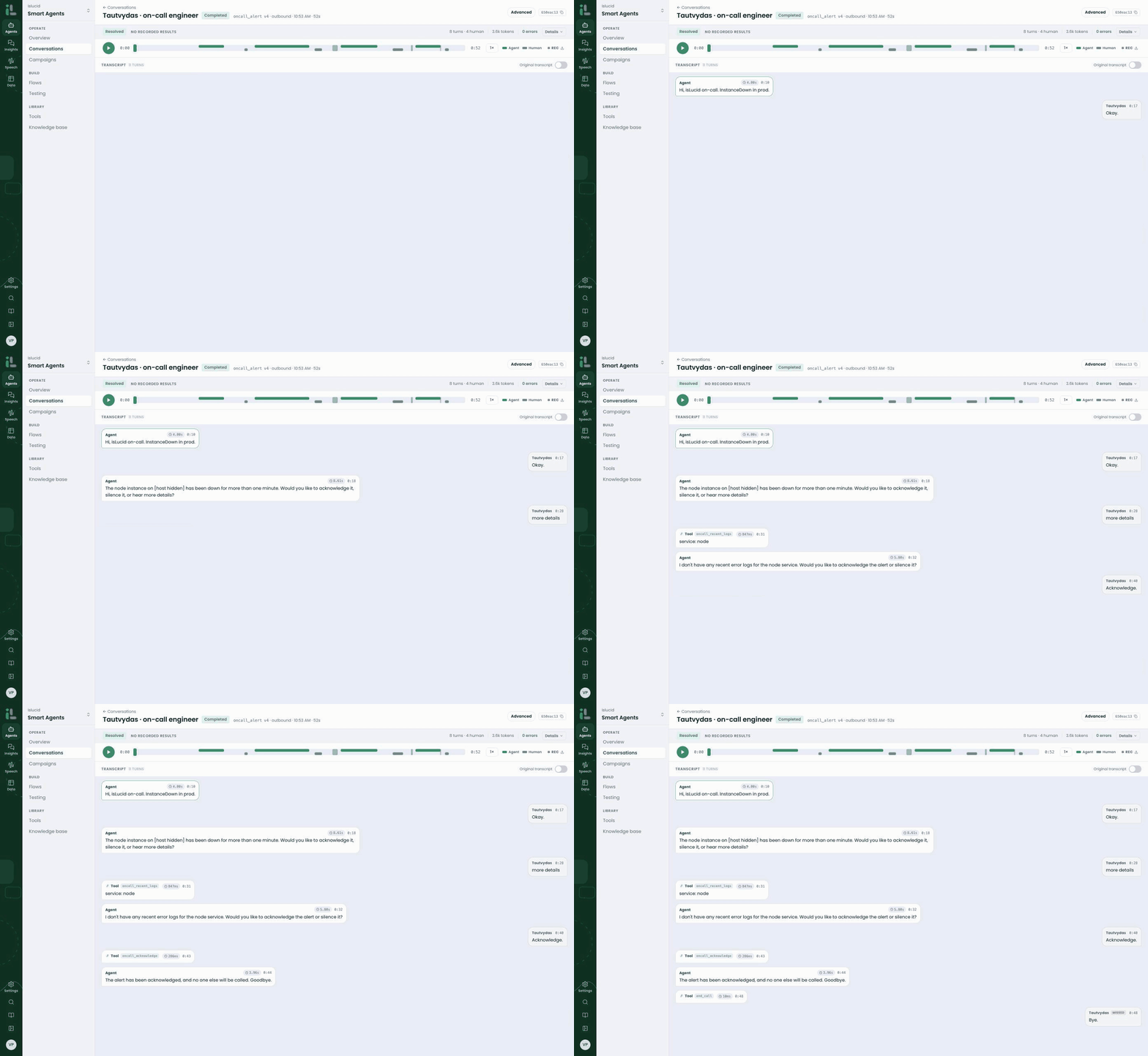
A real call from our own workspace. The phone number is replaced with the engineer's name and the host is hidden. The clock badges show how long each turn lasted.
All internal and external services, machines, customer telemetrics are wired to Grafana. Grafana spots a problem and fires an alert. The alert goes to isLucid. Our AI agent calls the engineer on duty. If engineer misses the call - second in line is picked. Up to the CEO.
> Agent: Hi, isLucid on-call. InstanceDown in prod.
>
> Tautvydas: Okay.
>
> Agent: The node instance on [host hidden] has been down for more than one minute. Would you like to acknowledge it, silence it, or hear more details?
>
> Tautvydas: More details.
>
> Agent: I don't have any recent error logs for the node service. Only the reboot message. Would you like to acknowledge the alert or silence it?
>
> Tautvydas: Acknowledge.
>
> Agent: The alert has been acknowledged, and no one else will be called. Goodbye.
52 seconds. The agent checked the error logs in Grafana while he was on the line. It acknowledged the alert through Grafana's API in 286 milliseconds. Nobody else got woken up.
You can say "acknowledge", "snooze it for an hour" or "what do the logs say?". If you ask for the logs, it reads the last hour of errors for that service and sums them up in a sentence or two. It doesn't read out raw log lines. We did precautious that in logs no PII is ever added. This allows to focus only on monitoring logs without creating any GDPR related risks.
How it was built in 95 minutes
Tautvydas didn't open a code editor. He felt the need. He built the whole agent from his AI assistant, connected to the isLucid portal through our MCP server. Every step is in the portal's audit log, marked "via MCP".
- 09:18 – Agent created.
- 09:33 – Three connections to Grafana saved and tested against the live Grafana API.
- 10:30 – First call.
- 10:32 – A fixed version goes live, two minutes after the first call.
- 10:53 – A clean call. The alert is acknowledged in Grafana.
That's 95 minutes from nothing to an agent that works.
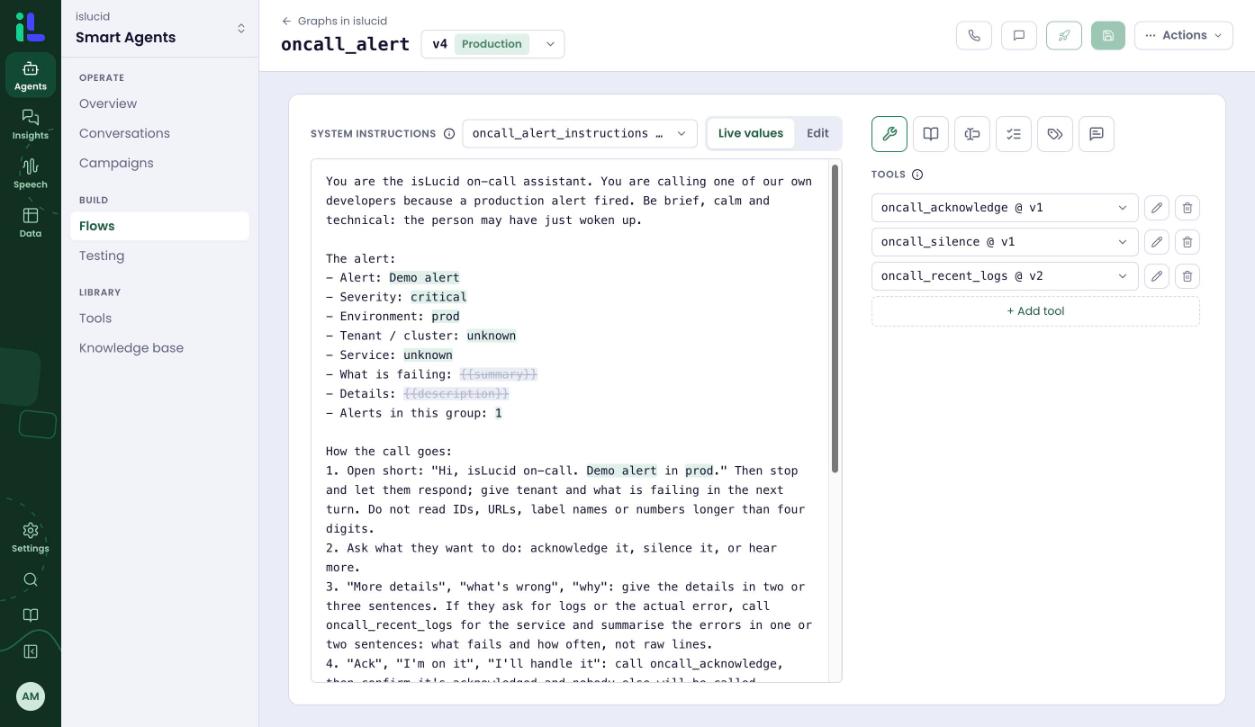
The agent in the builder: plain-language instructions, live alert values and three Grafana tools.
What he wrote
Not much, honestly.
- 305 words of instructions in plain English. Who the agent is, what the call should sound like, what it must never do.
- Nine alert fields. Alert name, severity, environment, service, summary and so on. Grafana fills them in for every call.
- Three API calls to Grafana. Acknowledge. Silence for a number of minutes. Fetch the latest errors.
What he didn't have to write
This is why it was so easy. The hard parts were already there.
- Voice. Speech in and out, turn-taking, interruptions, background noise.
- Phone calls. Dialling out, knowing when nobody answers, recording, transcripts.
- Safe connections. Every API call is built from the alert's own values. Passwords and tokens are stored as secrets that only work for one address. Nothing sensitive sits in the instructions.
- Testing before the first call. Each Grafana connection was tested against the real API before the agent dialled anyone.
- Versions. Draft, promote, roll back. Five versions on day one.
- Quality checks on every call. No one has to listen back to find problems.
- An audit trail. Every change, every call, every MCP action, with who and when.
No telephony code. No speech pipeline. No servers. No retry logic.
How to trust if it will not fail on a critical moment.
We don't hide our own bad calls. And we are proud of the system we built. The first ones are the most useful ones.
Call 1: the agent kept starting over
On the very first call the agent restarted its opening line three times. It didn't hear Tautvydas ask "What's happening?". The call ended without a goodbye.
Nobody had to listen to the recording to find this. The quality checks flagged it on their own: repetition, a missing goodbye and an unsupported claim. By 10:32, a fixed version was live. It will auto improve in case new edge case scenarios will appear.
Calls 2 and 3: Grafana said no, and the agent said so
On the next two calls, Grafana didn't accept the acknowledge and silence requests.
This is the moment that matters most with AI. A worse agent would say "Done, it's silenced." Ours said this:
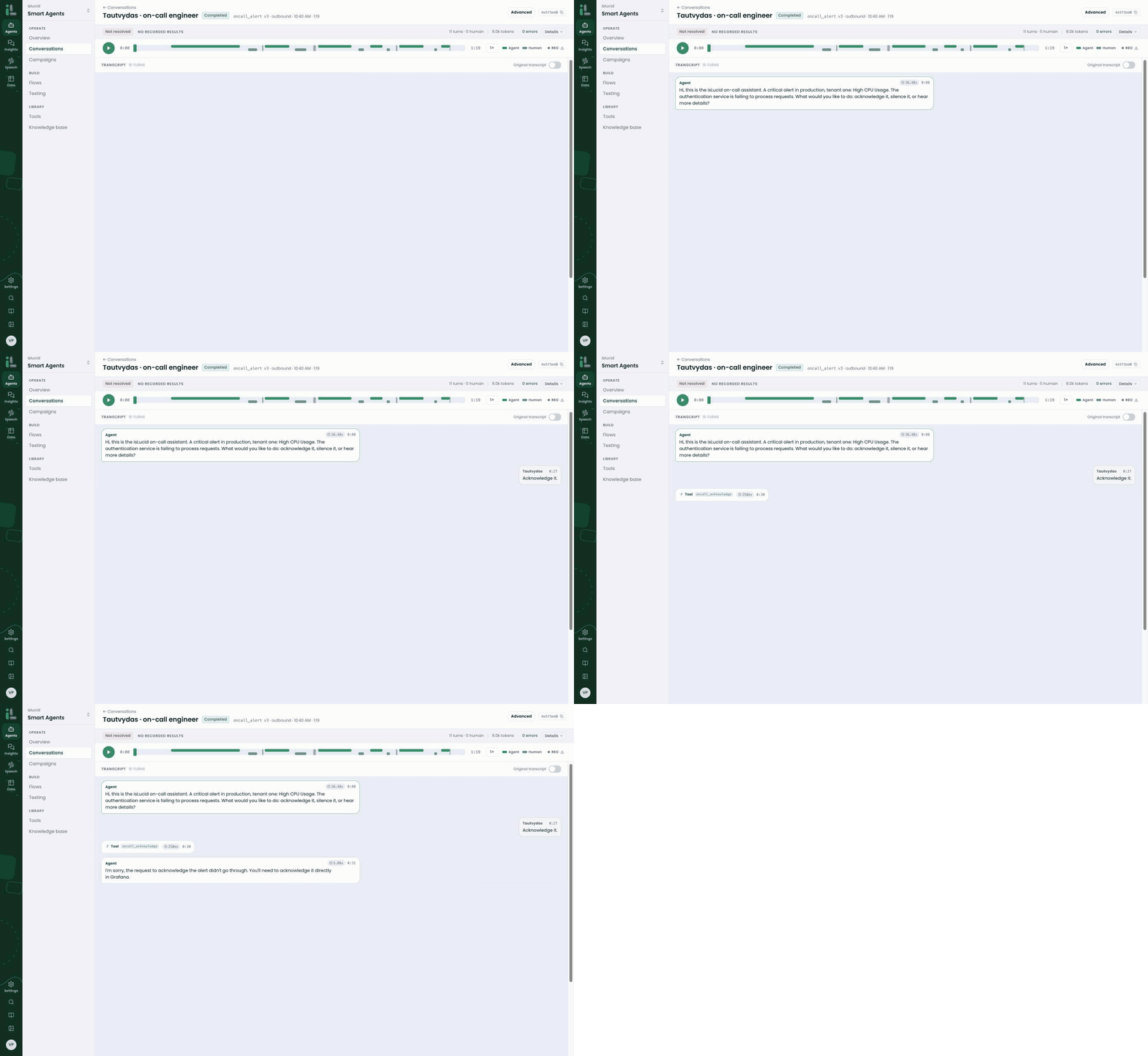
Grafana doesn't accept the request. The agent says it didn't go through and sends the engineer to Grafana.
> Agent: I'm sorry, the request to acknowledge the alert didn't go through. You'll need to acknowledge it directly in Grafana.
> Silent failure of service All infrastructure is living on a load balancer secured environments. Multiple regions, multiple phone numbers to use from different providers. If there is something wrong in logs - we will get notified under 5 mins:).
At the end of one of those calls, Tautvydas said: "Wow, amazing." The agent had already hung up, so it didn't hear him. We did.
> What we learned: the most dangerous thing an AI can say is "done" when it isn't. Test the failures, not just the happy path.
The rules it follows
- It never guesses. If it doesn't know why something broke, it says so and offers the logs.
- It never pretends. If a request fails, it says so and points you to Grafana.
- It never reads secrets aloud. No tokens, IDs, phone numbers or customer data, even if they show up in the logs.
- Grafana stays in charge. Grafana remains the source of truth. The agent only acts through Grafana's own API.
- It never hangs up first. The call ends when the engineer has decided.
"PagerDuty already calls me"
Fair point. Grafana IRM and PagerDuty both phone you. They read the alert and give you keys to press. That's a reliable way to wake someone up.
If that's all you need, keep it. Honestly.
We badly needed the next step too: context before the laptop is open, a summary of the errors, and the communication made in voice. That's what a conversation gives us and a keypad or SMS doesn't.
Build your own: same pattern, different alerts
Our on-call voice agent follows a simple pattern: an alert fires, the agent calls a person, the person decides, the agent acts.
That pattern fits far more than server alerts.
- Security monitoring. An alarm goes off. The agent calls the keyholder: false alarm, or send a patrol?
- Cold storage. A fridge gets too warm. The agent calls the store manager and logs the answer.
- Field work. A meter or substation alarm. The agent calls a technician: can you take the job?
- Shift gaps. Someone calls in sick. The agent calls down the staff list until someone says yes.
- Network operations. An alarm fires at night. The agent briefs the engineer and texts the bridge link.
An internal agent is also the safest way to start with voice AI. Nobody outside your company is on the line. Your own team gives you honest feedback. And you learn exactly how the platform behaves before a single customer hears it.
> Try it yourself: pick one alert that wakes someone up today. Write down what that person needs to hear and what they usually decide. That's your first agent's instructions.
We trust it with our own incidents
We ask companies to trust voice agents with their customers. It's only fair that we trust one with our own production.
It took Tautvydas 95 minutes because the hard parts were already done. That's the same platform you get.
Build your first voice agent
Sign up for free at portal.islucid.com. Connect your AI assistant, or just start in the browser.
- Describe your agent in plain words.
- Connect the tools it should use.
- Test it on your own phone before anyone else hears it.
Free for 14 days. One agent, 20 minutes of calls.